♠️ Battle FreeCell — race your friends to solve the same deal
Battle FreeCell is the classic FreeCell solitaire you know from Windows, played against your friends right in your phone browser. All 52 cards are dealt face up into 8 columns from the start, so it is a card game of thinking ahead more than luck. Park cards in the 4 free cells while you sort the columns, and build every suit from A to K on the foundations to win! With friends, everyone gets the same numbered deal on their own phone and the first to solve it wins. Alone, play at your own pace with no time limit and pick up where you left off after a refresh. No sign-up and no app.
- Players
- 2–8 (or solo)
- Time
- 5–15 min
- Who pays
- Nobody (first to solve wins)
✈️ No internet? Still play together — on a plane or at a campsite (host phone's hotspot + scan each other's QR)
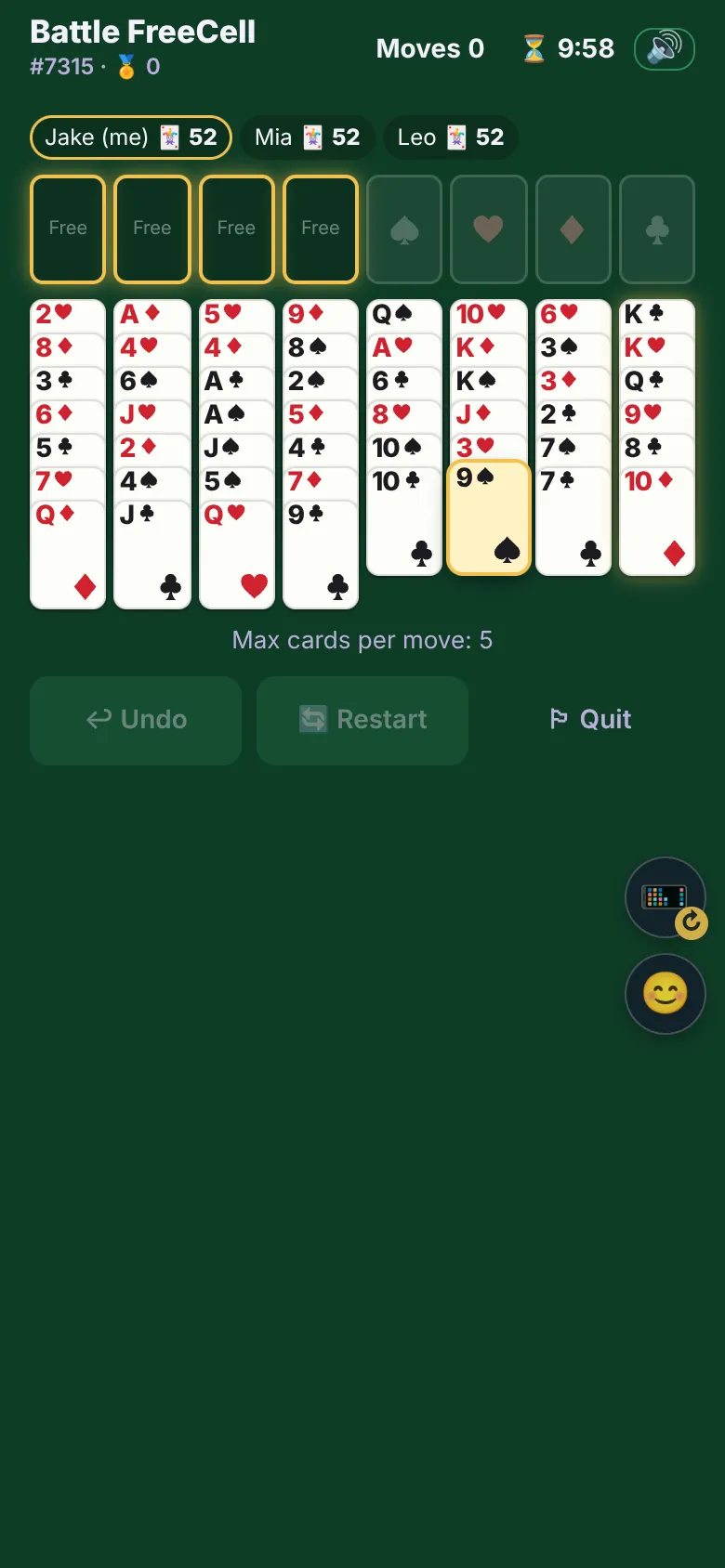
With friends: race to solve the same deal
- Same deal: when the game starts, everyone gets the same numbered deal (e.g. #12345). The layout is identical, so skill decides, not luck.
- Solve on your own: you can't see other players' cards; the top of the screen only shows how many cards each player has left (🃏). Watch who is pulling ahead!
- First to finish wins: the moment someone builds all 52 cards home, the game ends. Everyone else is ranked by cards left (fewest first), and equal counts share a rank.
- Time limit: the host picks 5, 10, 15 or 20 minutes. When time runs out or everyone quits, the same rule applies: fewest cards left ranks higher.
It's not a bet game, so nobody pays. It's a party game to find out who is best at FreeCell.
🎁 Item battle (with friends)
Turn on Item battle in the lobby and 6 cards ranked 1–5 get an item picture each deal (same cards for everyone, more often on low ranks). Home that card to trigger its item — each item works once per player. Attacks hit the current leader (not you), so trailing players can catch up.
- 🌫️ Fog: covers a rival's screen in fog for 15s (only near their finger is visible)
- ⏪ Rewind: rolls a rival's board back 10 moves
- 🂠 Flip: turns 8 of a rival's column cards face down for 20s (top cards stay)
- ❄️ Freeze: a rival can't move cards for 6s
- 💡 Hint: highlights a good move for your next 5 moves
- 🧲 Magnet: sends every card that can go home right now
- 🛡️ Shield: blocks the next attack (lasts until it does)
Alone: play at your own pace
Tap [Practice solo] with no other players to play on your own. There is no time limit, and if you refresh by accident the home screen offers to resume the same deal. Your time, solved deals and best time stay on this phone.
🏅 Collect solved deals: solo or with friends, every deal you solve is saved on this phone. The 🏅 number at the top is how many different deals you have solved, and a ✓ next to the deal number means you have solved it before. Solving the same deal again counts only once.
FreeCell rules
- Layout: 52 cards (no jokers) are dealt into 8 columns: the first 4 have 7 cards and the last 4 have 6. Every card is visible.
- Columns: on the bottom (front) card of a column you can only place a card of the opposite color, one rank lower. For example, only a red 7 (♥7 or ♦7) goes on a black 8. Any card can go in an empty column.
- 4 free cells: each holds one card for a while. They help you dig out buried cards, but once they are full you can barely move.
- 4 foundations: build each suit in order A, 2, 3 … K. Get all 52 cards home and you win.
- Moving several cards: a run in alternating colors and sequence can move together. You can move up to (free cells + 1) × 2empty columns cards at once: 5 cards with all 4 free cells empty, 10 with one empty column as well.
Controls and helpers
- Tap and place: tap a card to pick it up; the spots where it fits light up in yellow. Tap one to move it there. Tapping a card in the middle of a column picks up the run above it too.
- Tap again: tap the picked card once more to send it to the best spot automatically: home if it can go there, otherwise a column it fits on, otherwise a free cell.
- Auto home: safe cards that the columns no longer need move to the foundations on their own. Turn it off in the lobby settings if you prefer doing it yourself. When everything left is in order, the remaining cards fly home one by one to finish.
- Undo and restart: made a mistake? ↩ Undo steps back one move at a time, and 🔄 Restart replays the same deal from the beginning.
- Deal numbers: every deal has a number from #1 to #32000. Cards are shuffled the same way as Windows FreeCell, so the same number always gives the same deal.
Tips for solving
- Save your free cells. The more free cells are empty, the more cards you can move at once. Use them only when needed and clear them quickly.
- Empty columns are worth more than free cells. Each empty column doubles how many cards you can move. Try clearing the short columns first.
- Dig out the aces and twos. Working on the columns that hide an A or 2 deep inside builds the foundations faster and makes the deal easier.
- Think a few moves ahead. Every card is visible, so check what lies under a card before you move it and you will get stuck less often.
- Kings go to empty columns. A king can't go on another card, so placing one at the bottom of an empty column lets you build a long run.
Almost every FreeCell deal is known to be solvable. If you are stuck, undo a few moves and look for another way. Your time, moves and number of solved deals are saved on this phone, so you can chase your personal best.
How to start
- One person (the host) opens the site with the button below, enters a name and taps [Create a room].
- Tap + to show the room QR. Friends scan it with their phone camera and tap [Request to join]; once the host allows it, they're in. Friends who aren't nearby can join with an invite link.
- Pick the game in the lobby, set the rules and tap start. Want to try it alone first? Tap [Practice solo] with no other players.
FAQ
Can I play alone?
Yes. Tap [Practice solo] with no other players to play with no time limit, and resume after a refresh. With friends it becomes a race to solve the same deal first.
Can every deal be solved?
Almost every deal can be solved. Deal #11982, the one known to be unsolvable in Windows FreeCell, is never dealt.
Can I continue after an accidental refresh?
Yes. Reopen the site and the home screen offers to resume the deal you were playing — even after closing the browser, within 3 hours.
Is real money involved?
No. Chips, cash and points in the game are just for fun and no real money changes hands. It's a free way to decide who buys the coffee or lunch.
Can we play without internet, like on a plane?
Yes. If everyone opened the site once beforehand, connect all phones to the host phone's hotspot and join with "scan each other's QR". Games run directly between the phones, so no internet is needed. If Chrome asks to look for and connect to devices on your local network, tap Allow.
Do I need to install an app?
No. It opens right in your phone browser (iPhone and Android). If you use it often, add a home screen icon from ⚙️ settings.