🪵 Log Rollers — first one in the water buys the coffee
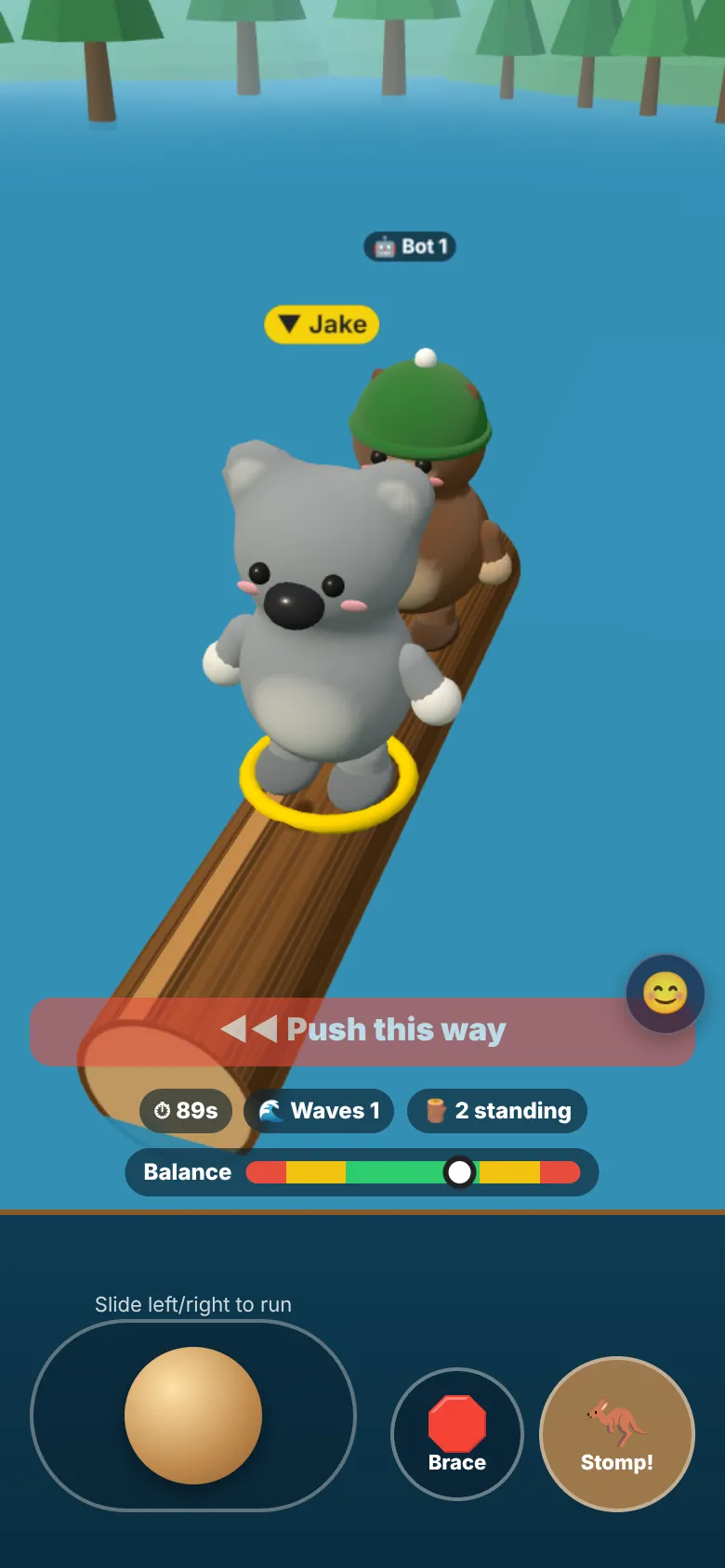
Log Rollers is a 3D balance game where everyone stands on one floating log and runs to stay on top. Each player steers their own chubby animal (koala, crane, shiba, cat, bear, penguin, sloth, frog or tiger) from their phone — but there is only one log, so when someone runs hard or stops suddenly, the log turns under everyone. The first one to splash into the water is on ☕ coffee duty! A round takes 1–2 minutes, perfect for the after-lunch coffee run or picking a forfeit at a team dinner.
- Players
- 2–8
- Time
- 1–2 min
- Who pays
- First to fall in the water
✈️ No internet? Still play together — on a plane or at a campsite (host phone's hotspot + scan each other's QR)
Rules
- Get ready: during a 3-2-1 countdown (one how-to tip per number), everyone takes their spot on the log. On your phone, your own character stands at the front.
- Stay on: when the log turns you slide to one side, so run the other way to stay on top. Change direction too fast and you wobble.
- Waves: every 30 seconds the waves get stronger. The first few seconds are calm.
- Result: the first one to fall in buys the ☕. If nobody falls before time runs out (60, 90 or 120 s), whoever was closest to falling buys.
Controls
- Run: slide the pad at the bottom left or right with your left thumb. A small push is gentle, a full push is fast.
- 🛑 Brace: hold it to bend your knees and wobble less, at the cost of slower feet.
- 🦘 Stomp: hop and land with a thud that jolts the log and shakes everyone else. Once every 4 seconds — land away from the top and you're in danger too.
- Help on screen: the balance bar shows where you are, and a "Push this way" arrow appears when you're in trouble.
- On a PC: ←/→ (or A/D) to run, Shift to brace, Space to stomp.
Difficulty and bots
The host picks Easy, Normal or Hard. On Easy (the default) a balance helper walks your feet back for you, so even first-timers last a good while; on Hard you're on your own. If you're short of players, add up to 3 🤖 bots with their own Easy, Normal or Hard skill. Bots count in the ranking, but only people can end up buying the coffee.
Great for
- The after-lunch "who's buying coffee?" — a real contest of skill, not just luck
- Team dinners and workshops — up to 8 players on one log, and a laugh every time someone splashes
- Play holding your phone upright — or turn it sideways for a wide landscape view
- Trying it alone — tap [Practice solo] to hop on the log with bots
It runs smoothest when everyone is on the same Wi-Fi or the host phone's hotspot.
How to start
- One person (the host) opens the site with the button below, enters a name and taps [Create a room].
- Tap + to show the room QR. Friends scan it with their phone camera and tap [Request to join]; once the host allows it, they're in. Friends who aren't nearby can join with an invite link.
- Pick the game in the lobby, set the rules and tap start. Want to try it alone first? Tap [Practice solo] with no other players.
FAQ
Is Log Rollers just luck?
No. It's a skill game decided by how well you run, though other players' moves and the waves keep turning the log, so comebacks happen right to the end.
Is it too hard for first-timers?
On Easy, the default, a balance helper keeps you up for a good while even if you stand still. Switch to Normal or Hard once you get the hang of it.
Can friends join from somewhere else?
Yes, they can join with the invite link and play. On networks where phones can't connect directly (mobile data, office Wi-Fi), updates go through the server and feel a little slower. The same Wi-Fi or hotspot works best.
Is real money involved?
No. Chips, cash and points in the game are just for fun and no real money changes hands. It's a free way to decide who buys the coffee or lunch.
Can we play without internet, like on a plane?
Yes. If everyone opened the site once beforehand, connect all phones to the host phone's hotspot and join with "scan each other's QR". Games run directly between the phones, so no internet is needed. If Chrome asks to look for and connect to devices on your local network, tap Allow.
Do I need to install an app?
No. It opens right in your phone browser (iPhone and Android). If you use it often, add a home screen icon from ⚙️ settings.