🕵️ Liar Game — one player doesn’t know the word
The Liar Game is a favorite party game in Korea, now on your phones with no paper cards. Everyone except the liar gets the same secret word; you take turns describing it out loud in one sentence and then vote on who the liar is. The app deals the cards, keeps the speaking order, runs the vote and handles the liar's final guess, so nobody has to sit out as the game master. It comes with 12 topics and 288 words — food, animals, jobs, places, office life and more.
- Players
- 3–8
- Time
- 5–10 min
- Who pays
- Nobody — liar vs citizens
✈️ No internet? Still play together — on a plane or at a campsite (host phone's hotspot + scan each other's QR)
How to play
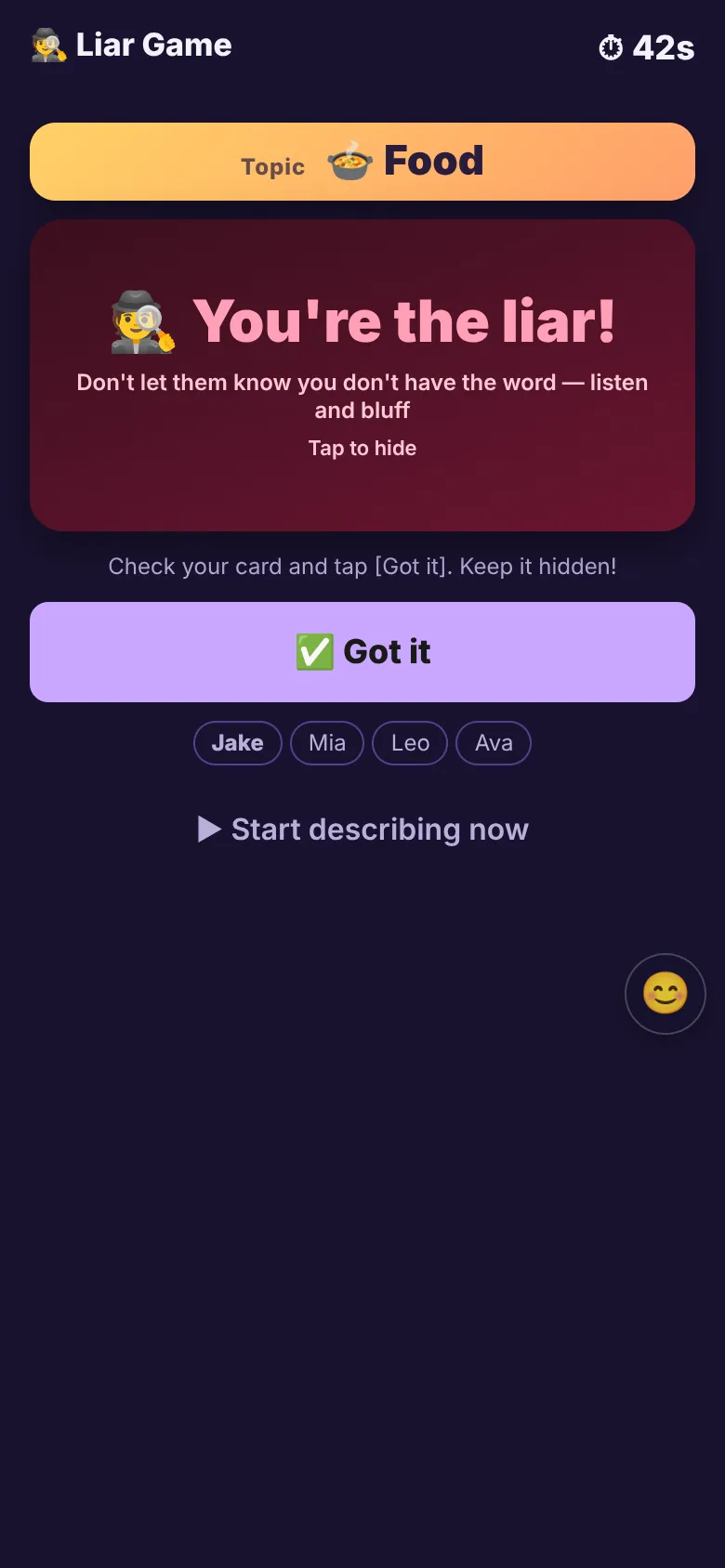
- Get your card: everyone except the liar sees the same word; the liar gets a "You're the liar!" card. The topic (e.g. Animals) is known to everyone, including the liar. Cards only show when tapped, so keep them hidden from your neighbors.
- Describe: starting with the player the app picks, go around in seat order and describe the word in one sentence, out loud. Tap [Done talking] to pass to the next player. Usually 2 laps; set 1–3 in the settings.
- Vote: after the descriptions, everyone picks who they think the liar is. The most-voted player is revealed. On a tie, the tied players face a second vote; another tie means nobody is accused.
- Result: if the accused isn't the liar, the liar wins. If it is the liar, they get a last chance: guess the word from the options to steal the win, or miss and the citizens win.
Settings
- Topic: random, or pick one of Food, Café & Dessert, Animals, Jobs, Places, Sports, Countries, Household items, Vehicles, Office life, Hobbies and Convenience store. Each topic has 24 words.
- Liar's card: tell the liar "You're the liar", or use fool mode and give them a different word from the same topic. In fool mode the liar doesn't even know they're the liar until they're caught.
- Descriptions: how many times each player describes (1, 2 or 3 laps). More laps give the liar more clues.
- Guess options: 6 or 12 options for the liar's final guess, or the whole topic (24). More options make it harder for the liar.
Tips
- Citizens: too obvious and the liar figures out the word. Twist your description so only your teammates get it.
- Liar: listen closely, then say something plausible that doesn't repeat what others said. Even if you're caught, collect the clues and guess the word.
- Be too vague and you'll be accused even as a citizen — that's half the fun!
Great for
- Team dinners, workshops and retreats — from 3 up to 8 players
- Starting right away, with no paper cards and no game master
- A break between coffee-bet games — no one pays, it's liar vs citizens
The host creates a room and everyone else scans the QR code. Talk face to face; the phones just handle the cards and the vote. When it's over, tap [Play again] to start the next round.
How to start
- One person (the host) opens the site with the button below, enters a name and taps [Create a room].
- Tap + to show the room QR. Friends scan it with their phone camera and tap [Request to join]; once the host allows it, they're in. Friends who aren't nearby can join with an invite link.
- Pick the game in the lobby, set the rules and tap start. Want to try it alone first? Tap [Practice solo] with no other players.
FAQ
How many players do you need?
From 3 to 8 players. It is the most fun with 4 to 6.
What is fool mode?
Instead of a liar card, the liar gets a different word from the same topic, so they describe it without knowing they are the liar.
Can the host see who the liar is?
Each screen only shows your own card. The liar and word come from everyone’s phone randomness, and players’ phones re-check the result at the end.
Is real money involved?
No. Chips, cash and points in the game are just for fun and no real money changes hands. It's a free way to decide who buys the coffee or lunch.
Can we play without internet, like on a plane?
Yes. If everyone opened the site once beforehand, connect all phones to the host phone's hotspot and join with "scan each other's QR". Games run directly between the phones, so no internet is needed. If Chrome asks to look for and connect to devices on your local network, tap Allow.
Do I need to install an app?
No. It opens right in your phone browser (iPhone and Android). If you use it often, add a home screen icon from ⚙️ settings.